Financial Reporting Automation

CASE STUDY

Xero-to-Asana Financial Reporting Automation

Automatically connect financial data from Xero with project management workflows in Asana u2014 reducing manual data entry and keeping teams aligned.

See How It Works u2193 Built with Make u2022 Xero u2022 Asana
Professional modern financial dashboard and accounting screen showing automation workflows

AUTOMATION WORKFLOW

See How It Works

See how financial data moves automatically from Xero into structured reporting tasks and records in Asana.

01 / Xero Trigger

Detects newly finalized invoices, receipts, and statement updates directly inside your Xero accounting portal.

02 / Make Engine

Make.com intercepts data, formats variables, and standardizes critical details into secure, JSON payloads.

03 / Asana Action

Instantly populates customized dashboard tasks and audit logs, ready for review and project allocation.

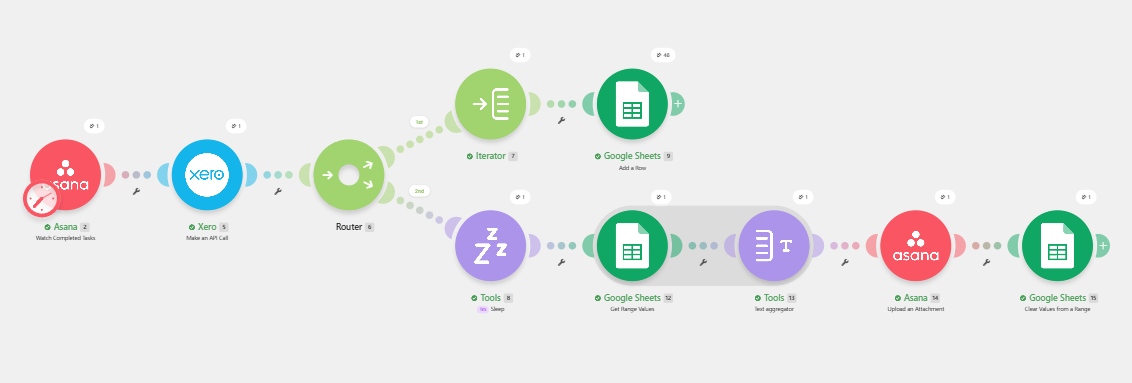
Watch the Workflow in Action

See how transaction data is pulled from Xero and automatically transformed into structured records and tasks inside Asana.

The Problem


Compiling financial reports manually u2014 pulling transaction data from accounting software and turning it into a usable format for the team u2014 is slow, repetitive, and prone to human error.

Teams that manage projects in Asana but track finances in Xero end up doing double work just to keep both systems in sync.

MANUAL PROCESS FLOW

Xero (Raw Financial Data)
Manual CSV Export
Formatting & Cleanup
Re-entering Data Manually
Asana Project Hub

SYSTEM ARCHITECTURE

The Solution

I built an automated workflow that pulls account transaction data directly from Xero and generates structured reporting tasks and records inside Asana. Instead of someone manually exporting, formatting, and re-entering financial data, the system keeps both platforms in sync automatically.


Live Integration Flow

Xero

Account Transaction Data

Make Automation

Process & Structure Data

Asana

Reporting Tasks & Records

What Happens Automatically?

Our multi-system workflow takes the manual effort out of reconciliation and task management. Here is how your data flows seamlessly in real-time.

01 u2014 Pull Financial Data

Transaction data is automatically retrieved from Xero.

02 u2014 Process & Structure

The automation organizes the financial information.

03 u2014 Create Asana Records

Structured reporting tasks and records are generated.

04 u2014 Keep Systems Aligned

Workflow helps keep records synchronized.

CASE STUDY OUTCOME

The Result

Financial reporting that used to require manual compilation now happens automatically, removing repetitive data entry and keeping the team’s project and financial records aligned without extra manual work.

Less Manual Data Entry

Reduce repetitive exporting/formatting.

Better Alignment

Keep records connected between Xero and Asana.

Automated Reporting

Turn data into tasks automatically.

Built With

The highly-integrated, enterprise-grade technology stack driving our automated reporting, analysis, and execution workflow.

Make

The core visual workflow engine used to map complex logic, parse payload data, and securely route transactional updates across multiple enterprise APIs in real time.

Xero

The system of record for all financial ledger data. Xero automatically reconciles bank lines, schedules invoicing, and acts as the secure source of truth for the organization.

Asana

The collaborative workspace where automatically generated tasks, anomaly flags, and multi-department checklist items are assigned and tracked to completion.

SYSTEM INTEGRATION

Ready to Connect Your Business Systems?

Automate repetitive data entry and connect the tools your team already uses so information moves where it needs to go automatically.